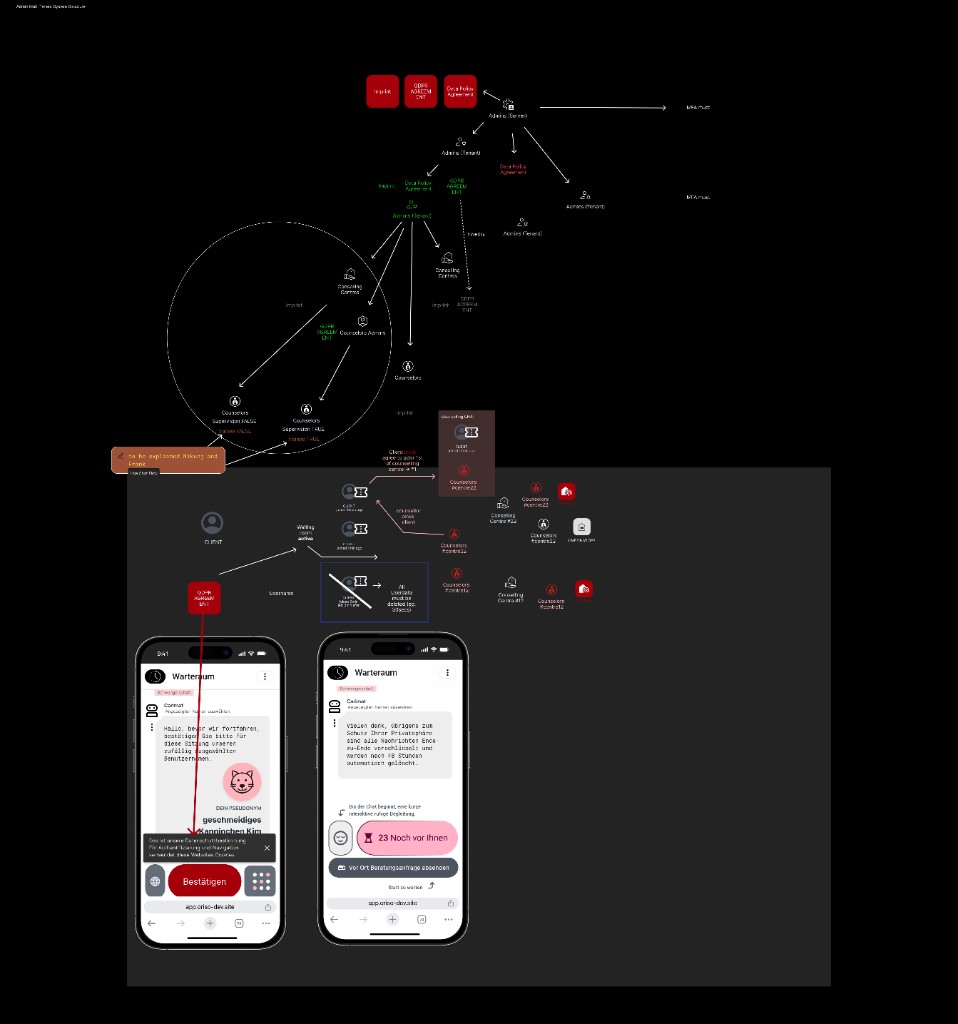
Reading of the Figma diagram and the visible production screens: each screen's purpose, key components, user actions, and backend interaction.
This page interprets the Figma role-hierarchy + live-chat flow diagram (reproduced below) and the visible production screens captured in the same file. It is the bridge between the role/feature pages and the actual pixels a designer or frontend dev sees.
Top-right: the role hierarchy (Platform Admin → Tenant Admin → Counselor Admin → Counselor) with the MFA must annotation on Platform Admin and Tenant Admin, and the Imprint / Data Policy / GDPR Agreement documents attached to each tier.
Middle: how legal text inherits down the tree (solid arrows = create, dashed = inherit / fallback) into the Counseling Centers and from there to the live-chat ticket flow.
Bottom-left: two iPhone mockups showing the Waiting Room (Warteraum) with a GDPR consent pop-up ("Bestätigen") and the queue position indicator ("23 Noch vor Ihnen").
We document each visible screen below, in the order a real client or staff member encounters them.
The bottom-left phone in the diagram. German label: Warteraum.
Aspect
Detail
Screen name
Waiting Room — Pre-consent state
Audience
Anonymous Client, mobile-first
Purpose
Capture initial GDPR consent and put the client into the queue.
Key components
Header Warteraum with timer; pseudonym block ("DEIN PSEUDONYM — geschmeidiges Kanninchen Kim"); explanatory text ("Hallo, bevor wir fortfahren, bestätigen Sie bitte für diese Sitzung unserer auflagig diagnostizen Benutzerinnen…"); animated cat avatar; bottom modal with "Bestätigen" CTA and language / app-grid icons.
User actions
Read consent text → tap Bestätigen to confirm the platform-default GDPR. (Optional) tap the language globe to switch language.
Backend interaction
On entry: POST /live-chat/anonymous returns ticket id + cookie. On confirm: POST /live-chat/consent?level=platform records consent. Frontend then transitions to the queued state.
Notes / rules
Pseudonym is deterministic-on-randomness; never reused. The page must default to the browser's language (English fallback, not German) on first paint.
Reassure the client during the wait, surface E2EE guarantee, allow self-service routing changes.
Key components
Privacy reassurance banner ("Vielen Dank, übrigens zum Schutz Ihrer Privatsphäre sind alle Nachrichten Ende-zu-Ende verschlüsselt und werden noch nach 48 Stunden automatisch gelöscht."); emoji breathing-game button; the "23 Noch vor Ihnen" queue counter; an "Vor Ort Beratungsanfrage absenden" CTA (file an in-person enquiry instead); a Spiel zu warten (game while you wait) link.
User actions
Wait. Optionally play the breathing-game animation. Optionally switch to an enquiry. Optionally cancel (closes tab → wipe).
Backend interaction
Periodic heartbeat to POST /sessions/{id}/heartbeat (or WS); queue position fed by Redis; counselor-acceptance push delivered via Redis Pub/Sub.
Notes / rules
Counter must be live (update on Pub/Sub events, not polling). The wording on retention (48 h) must be honoured — it's a public promise.
Inferred from the diagram's "Admin (Tenant)" node and from the existing admin panel screens described in the huddle.
Aspect
Detail
Screen name
Admin Dashboard — Tenants tab (for Tenant Admin)
Audience
Tenant Admin
Purpose
Manage counseling centers, see queue health across the tenant, edit tenant-level legal templates.
Key components
Left nav (Counseling centers, Counselors, Settings, Legal); top KPI cards (centers, active counselors, waiting clients); table of centers with status / live-chat enabled / counselor count; "Create center" CTA.
User actions
Create center; edit a center; invite counselor admin; edit tenant Imprint / Data Policy / GDPR.
Backend interaction
AgencyService for centers; TenantService for legal templates; UserService for invites.
A frequent confusion: the popup in the Waiting Room is platform-level; the popup that appears at counselor-pickup is center-level. Visually they should be distinguishable (different headers, different "powered by …" footers).
The legacy enquiry chat (zip-code based, registered) lives alongside live chat on the counselor's dashboard — they share the navigation but are separate sections.
The Waiting Room and the Live Chat are designed mobile-first (the Figma mockups are iPhone-15-Pro). The admin panel is desktop-first (data tables, multi-column).
Live-chat onboarding redesign — the breathing-game / waiting-room flow has half-built screens; needs to be finalised. (Ticket: "fix live chat onboarding screen design".)
Live-chat link generation UI — overengineered today, simplify to "one button per topic per agency".
Bilingual UI — all screens must support EN/DE side-by-side, default to browser language with EN fallback.
Design-system alignment — admin panel screens have visible drift from Figma; refactoring backlog item.
Removed sections must be visibly deactivated, not hidden — global rule.
Group name + Supervision badge; participant initials; composer with multi-recipient picker; tools row (Reply directly, Reply in Thread, Mark Text, PII Blur, Forward, Delete, Add)
Backend
Matrix room with E2EE; tool gating per chat-type Permissions Matrix; counselor-only tools rejected for client role
"Wähle wer diese Nachricht sehen soll" header; participant list with checkboxes; "Select All Counsellors / Moderators / All"; result chip "visible only to: …"; Reply directly / Reply in Thread toggle
Backend
POST /messages/restricted via Carimat-relay; per-recipient Megolm
Hard rules
A) hide in 1-1; B) grey when 2+; C) chat-type icon; D) memorise last selection per chat; E) always hidden for clients